RAD & Roll: How to Build Better WordPress Websites, Faster
A practical guide to Rapid Application Development, the WordPress project lifecycle and communication that keeps projects moving.
A website project can start with a simple request: “We need a new site.” But between that first conversation and the launch, there are decisions about design, content, functionality, feedback and sign-off. Without a clear process, a quick project can turn into months of revisions and crossed wires.
That is where Rapid Application Development (RAD) comes in. The idea is straightforward: show the work early, get useful feedback and improve it in short cycles. Combine that with a sensible WordPress workflow and clear communication, and the whole process becomes easier to manage.
What is Rapid Application Development (RAD)?
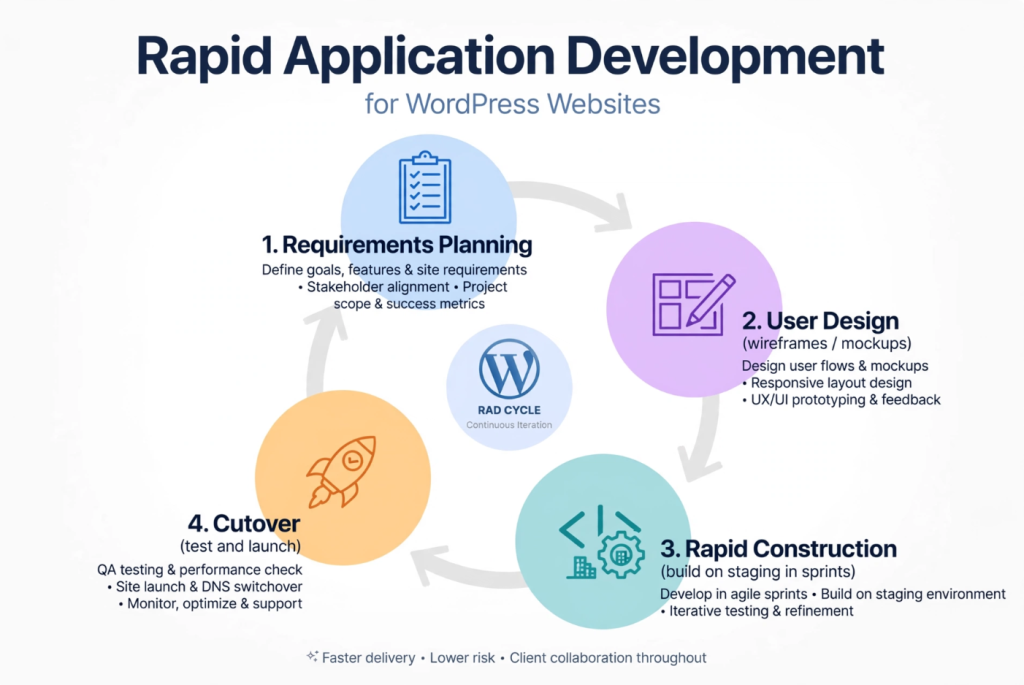
Rapid Application Development is an iterative approach to building digital products. Instead of spending months planning every detail before anyone sees the result, the team creates mockups and working prototypes, shares them with the client and refines them as the project develops.
A traditional waterfall process tends to follow a long sequence: plan everything, build everything and reveal the finished result much later. The risk is that the client may only then say, “That’s not what I meant.” RAD reduces that risk by creating opportunities to respond while changes are still relatively easy to make.
The guiding principle is simple: show early, show often, fix fast. Learn more about iterative methods in the official Scrum Guides.
The Four Stages of Rapid Application Development
1. Requirements planning
Start with a focused kickoff to understand the goals, essential features, budget and practical constraints. This stage is about agreeing on what matters most, not producing paperwork for its own sake.
2. User design
Turn the requirements into wireframes, mockups or clickable prototypes. Giving the client something visual makes it easier to discuss layout, user journeys and functionality before the full build begins.
3. Rapid construction
Build and test the website on staging in short sprints, typically one to two weeks. Use dependable WordPress themes, block patterns and trusted plugins where appropriate instead of rebuilding common functionality from scratch. Each sprint should end with a demo and an opportunity for feedback.
4. Cutover
Once the agreed work is ready, test it, prepare the team to use it and launch. The design and construction stages may loop several times before reaching this point. That is part of the process, not a failure of it.
Each loop is part of Rapid Application Development — not a failure, just progress.
How to Make Rapid Application Development Work in Practice
RAD is fast, but it is not a free-for-all. It needs structure, timely feedback and clear ownership of decisions. A few habits make a major difference:
- Prioritise visual mockups and working examples over overly long specifications.
- Timebox work into manageable sprints with real deadlines.
- Keep the client involved through regular demonstrations and feedback.
- Reuse reliable tools, patterns and components where they fit.
- Treat feedback as useful input, even when the request seems small.
- Aim to launch a solid, tested solution and keep improving it afterward.
This approach works best when requirements can be broken into smaller pieces, reusable tools are available and the client can review progress regularly. It becomes harder when feedback is delayed for weeks, requests keep expanding without agreement or nobody is responsible for final approval.
The life of a WordPress website: from idea to launch
We follow this process for all projects — see how we herded cats on our last project.
RAD gives the project its rhythm. A clear WordPress lifecycle makes sure the team covers the full journey, from the first brief to ongoing maintenance.
Discovery
Ask the right questions before making assumptions. Understand what the organisation needs the website to achieve, who it needs to reach and what functions are essential. The outcome should be a brief, sitemap and quotation that everyone understands and agrees to.
This discovery step makes Rapid Application Development smoother later.
Sitemap and wireframes
Map the website structure and the key page layouts. Wireframes are intentionally simple: they are easier and less expensive to change than a fully developed page. This is the right moment to move sections, simplify navigation and test the basic flow.
Visual design
Create an on-brand design that looks good and works across desktop, tablet and mobile devices. Focus on usability as much as appearance: visitors should be able to find what they need without having to figure out the interface.
Build on staging
Develop the WordPress website in a staging environment using the agreed theme, blocks and plugins. Staging is where the team can experiment, test and refine without disturbing the live website. Whenever practical, structure content so non-developers can make routine edits.
Content
Replace placeholder text with real, useful copy. Content should explain the organisation, its services and the actions visitors should take. A polished layout cannot compensate for unclear messaging.
Quality assurance and user acceptance testing
Test the website before launch and invite the client to check that it meets the agreed requirements. Quality assurance (QA) and user acceptance testing (UAT) help catch issues while they can still be fixed on staging. Obtain clear client sign-off before the site goes live.
Launch
Prepare for launch by checking the relevant domain and DNS settings, SSL, redirects and other launch requirements. Confirm the site behaves as expected on the live environment.
Care and growth
A launch is the beginning of the next phase, not the end of the project. Keep WordPress core and plugins updated, maintain backups, monitor uptime and security, and review performance. Analytics and Search Console data can guide improvements, while landing pages, SEO content and campaigns help the site support broader marketing goals.
Keep the development cycle short and visible
During design and build, use a repeating cycle: prototype, draft or demo, gather feedback and tweak. Repeat this over one- to two-week sprints. Each demonstration gives the client a chance to identify issues before they become expensive changes.
The key distinction is between staging and live. Staging is the place to build and test; the live site is the experience visitors rely on. Treating those environments differently helps protect quality while still moving quickly.
Choose the right communication channel
A strong project process can still fall apart if approvals, urgent messages and internal discussions get scattered across different conversations. Give each channel a clear purpose.
Email: the official paper trail
Use email for quotations, proposals, scope changes, client approvals, sign-offs, invoices and meeting recaps. Anything involving money, scope or a formal “yes” should be documented in writing. Keeping replies in the original thread makes the record easier to follow.
WhatsApp: quick and urgent updates
Use WhatsApp for time-sensitive problems, short confirmations and quick messages such as “The site is down,” “I’m running five minutes late” or “Please check your email.” It should not become the main home for approvals, substantial documents or sensitive login details. Follow up urgent decisions in email so there is a written record.
Slack: internal team coordination
Use Slack for day-to-day project chat, stand-ups, developer and designer questions, staging links and screenshots. Keep discussions in the relevant project channel and use threads so updates stay organised without flooding everyone’s notifications.
Four communication mistakes to avoid
- Approving designs through voice notes instead of getting written confirmation by email.
- Sending passwords over WhatsApp instead of using the designated secure vault.
- Starting a fresh email instead of replying to the existing project thread.
- Leaving a client without a response for days; even a brief acknowledgement helps set expectations.
If a website is down or there is a launch crisis, alert the team quickly through WhatsApp and then recap the issue and outcome by email. If a question concerns scope, costs or approval, use email. If it is an internal production matter, use the relevant Slack thread.
Clear communication is what keeps Rapid Application Development moving.
What happens after launch?
The first month after launch is a good time to review what is working and what needs attention. Check analytics and Search Console, discuss the results with the client, and address issues supported by the data. Continue with technical care such as updates, backups, uptime monitoring and security checks.
From there, development and marketing can work together. SEO content, campaigns and new landing pages provide opportunities to improve the website over time, rather than treating the launch as a final handover with no follow-through.
Final thoughts: build fast, communicate clearly and keep improving
Good web development is not simply about how quickly a team can publish a site. It is about making the right decisions early, showing progress regularly, testing before launch and keeping communication clear enough that everyone knows what happens next.
RAD provides the feedback loop. WordPress provides the platform. A clear communication process holds the project together. Put all three in place and you have a practical way to build, launch and improve websites with fewer surprises.