A beginner-friendly guide to website structure, styling, and how they work together.
Introduction
Every website we visit, from a simple personal blog to a large online store, relies on a foundation that tells the browser what to display and how it should look. Two technologies are central to that foundation: HTML and CSS. HTML organizes the content of a page, while CSS controls its appearance.
Understanding their different roles is an excellent starting point for anyone interested in web development, website management, or digital design. Together, they help turn information into a clear, attractive experience for visitors.
What Is HTML?
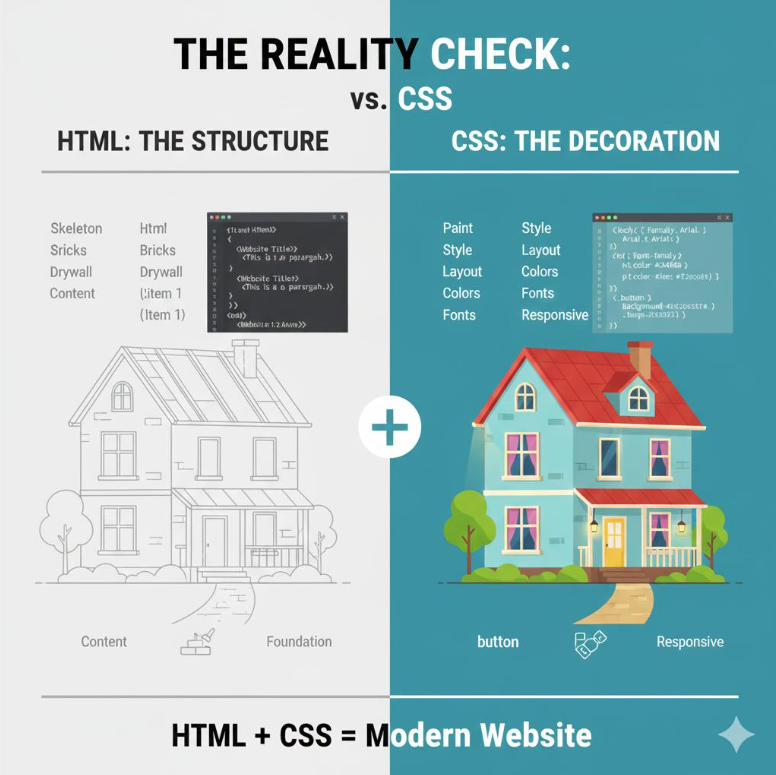
HTML stands for HyperText Markup Language. It is the standard markup language used to describe the structure and meaning of content on a web page. Think of HTML as the blueprint of a house: it identifies the rooms and their purpose before anyone chooses paint colors or furniture.
On a website, HTML identifies headings, paragraphs, images, links, and other elements. Browsers read these elements and arrange the content into a meaningful document. HTML is not a programming language for calculations or decision-making; its main responsibility is describing content.
The Building Blocks of an HTML Page
HTML uses tags to identify different types of content. Heading tags, from <h1> to <h6>, establish a hierarchy of topics and subtopics. The <p> tag marks a paragraph, while <img> places an image in the document. Links use the <a> element and an href attribute to connect visitors to other pages or resources.
These simple elements make pages easier to understand and navigate. Meaningful headings also help screen-reader users move through content and give search engines clues about what a page discusses. Choosing the correct element is therefore about more than appearance: it supports usability and accessibility.
Why HTML Is Widely Used
One of HTML’s biggest advantages is that beginners can start with a small set of understandable tags. It is free to use and supported by major browsers, including Chrome, Firefox, Safari, and Edge. HTML documents are generally lightweight and work well alongside other web technologies. Its familiar structure also makes content easier for search engines to interpret when pages are written carefully.
Another strength is its long history of compatibility: websites built with established HTML elements can often remain readable for many years. For businesses, this creates a dependable starting point for publishing information online.
Understanding HTML’s Limitations
HTML is powerful, but it is not designed to handle every task on its own. A page made only with HTML can present text, pictures, and links, but it cannot provide sophisticated interactive behaviour without additional technology. Features such as live form feedback, changing content without a full page reload, or interactive quizzes typically rely on JavaScript and sometimes server-side services.
Complex pages can also become difficult to maintain when their markup is repetitive or poorly organized. Security depends on the whole application: unsafe handling of user input, for example, can expose a website to cross-site scripting. HTML works best when it is part of a thoughtfully designed system.
What Is CSS and Why Does It Matter?
CSS stands for Cascading Style Sheets. If HTML is the structure of a house, CSS is the interior design: the colors, typography, spacing, and layout that make each room comfortable and visually appealing. CSS can style headings, control the distance between sections, create borders, and arrange content in columns.
It also helps websites adapt to different screen sizes, so a layout that looks good on a desktop can remain readable on a phone. Without CSS, most pages would look basic, even if their information was complete. Effective styling improves clarity, consistency, and the overall visitor experience.
How HTML and CSS Work Together
HTML and CSS have separate but complementary responsibilities. HTML explains what each piece of content is; CSS determines how that content appears. For example, HTML might identify a section as a heading and the following text as a paragraph. CSS can then make the heading larger, change its colour, and add space below it.
This separation is useful when a website needs a redesign. Developers can often update a style sheet without rewriting the underlying content. It also reduces repeated work: the same visual rules can be applied across many pages, giving the entire website a consistent identity.
Understanding how HTML and CSS work together is the foundation of creating a professional, attractive, and user-friendly website. If you’re looking to bring your business online, explore Zilo Digital’s Web Design Packages to take the next step towards building your online presence.
Three Ways to Add CSS to HTML
There are three common approaches to styling an HTML document.
- Inline CSS places a style directly on an element, such as <p style=”color: blue;”>. This is quick for a small adjustment but can become difficult to manage.
- Internal CSS is written inside a <style> element in the document’s <head>, making it useful for page-specific styling.
- External CSS lives in a separate file and is connected using a <link rel=”stylesheet” href=”style.css”> element. External stylesheets are usually the most practical choice for multi-page websites because one update can improve the appearance of many pages at once.
Understanding how HTML and CSS work together is the foundation of creating a professional, attractive, and user-friendly website. If you’re looking to bring your business online, explore Zilo Digital’s Web Design Packages to take the next step towards building your online presence.
Why Separating Structure and Design Is Important
Keeping HTML and CSS organized makes websites easier to update, troubleshoot, and grow. If a company changes its brand colours, developers can adjust shared CSS rules rather than edit every paragraph individually. Clear HTML remains focused on the meaning of the content, while CSS handles presentation.
This approach also supports teamwork: content creators, designers, and developers can work on related parts of a website without unnecessarily interfering with one another. As projects expand, reusable styles and consistent structures become especially valuable. Good organization saves time and helps visitors enjoy a more predictable browsing experience.
The Next Step: Adding Interactivity
Once HTML and CSS are understood, JavaScript is a natural next subject to explore. HTML provides the page’s elements, CSS makes them visually engaging, and JavaScript can respond to user actions. A button, for example, may be defined in HTML, styled in CSS, and programmed with JavaScript to reveal additional information when clicked.
These technologies are often used together, but each has a distinct purpose. Learning their roles separately makes it easier to understand how a complete website works and where to look when something needs improvement.
Conclusion
HTML and CSS are essential foundations of the modern web. HTML gives a page its content, structure, and meaning; CSS shapes its layout, appearance, and responsiveness. HTML is approachable and widely supported, although interactive features require additional tools.
CSS builds on that reliable structure to create a consistent, user-friendly experience. Whether you are starting a blog, managing a business website, or learning to code, understanding how HTML and CSS work together provides a strong base for future web development skills.
For further learning, explore the HTML and CSS tutorials available on MDN Web Docs.